Introduction
Running a growing business means juggling many plates. Busy owners and marketing leaders often feel like they spend more time entering data or chasing missed calls than actually talking to customers. Research shows that sales reps devote only 30% of their week to selling, while the remaining 70% is eaten up by administrative tasks, data entry and follow‑ups. Not surprisingly, teams that adopt sales automation see big gains—cutting lead response times by up to 90% and increasing qualified opportunities by around 33%.
This article explains how CRM automation—from missed-call text‑backs to complete follow‑up workflows—can help small and medium‑sized businesses improve lead management, reduce busywork, and provide a better customer experience. It also highlights the best tools to consider. Throughout the article, you’ll notice keywords relevant to the services of a Calgary digital marketing agency, including SEO services, lead generation for contractors, social media marketing, PPC campaigns, CRO services, reputation management, local SEO, web development and marketing automation for home services. These terms demonstrate how CRM automation supports a broad range of digital marketing services.
Why CRM Automation Matters

Manual processes don’t just slow your team down; they lose you money. Studies show that only one-third of B2B sales reps meet their quotas, and inconsistent follow-up is a major culprit. Without automation, reps waste hours updating records and preparing proposals—time that could be spent nurturing leads or optimizing lead generation for contractors in Calgary campaigns. That’s why intelligent workflows are transforming sales: 78 % of teams report improved pipeline management, 33 % gain overall efficiency, and 27 % enjoy higher close rates after implementing automation. Automating routine work also reduces stress—76 % of sales reps say automation lowers work‑related pressure.
Speed‑to‑Lead and Follow‑Up Timing

Responding to inquiries quickly is critical. Harvard Business Review found that companies that respond to new leads within an hour are seven times more likely to qualify them. A speed‑to‑lead study notes that automated lead routing can reduce response times by 82 % and significantly boost meeting‑to‑opportunity conversion rates. Similarly, an automation guide reports that properly configured tools can cut response times by 90 %, dramatically increasing the chances of turning enquiries into sales. These insights underscore why a Calgary digital marketing agency should invest in fast, automated follow‑up for PPC campaigns and social media marketing leads in Calgary.
Benefits of Missed Call Text‑Backs

Unanswered calls are often lost opportunities. Instead of letting them slip away, a missed call text‑back system automatically sends a personalized SMS to the caller, acknowledging the call and offering to help. One case study reports that such systems boost response rates by up to 30% and integrate easily with CRMs such as HighLevel or Zapier. Because text messages have a high open rate, businesses using text‑back sequences recover up to 40% more leads and see 25% more bookings than with voicemail alone. This simple automation ensures potential clients for your SEO services or local SEO services in Calgary receive immediate attention, even outside business hours.
Building Effective Follow‑Up Workflows
Automation doesn’t stop at the first reply. Effective follow‑up workflows nurture leads until they’re ready to buy. Here’s how to design a workflow that feels human while running on autopilot:
1. Identify Triggers and Create Templates

Use your CRM to define what should start a workflow: a new contact form submission, an email reply or a missed call. Then craft response templates that reflect your brand’s tone. Personalize messages by pulling in details like the lead’s name, previous interactions or the service they’re interested in—whether that’s web development Calgary or reputation management Calgary. Research shows that 91 % of consumers are more likely to do business with brands that provide relevant, timely communication, so personalization is key.
2. Time Your Messages
Send the first follow‑up quickly—ideally within the first hour—to maximize conversion odds. Subsequent messages can be spaced out over days or weeks, depending on the typical sales cycle for CRO services in Calgary or marketing automation for home services. Use your CRM’s analytics to test different timings and refine your approach.
3. Automate Task Reminders and Lead Recycling
Automation isn’t just for emails or texts. Set your CRM to create tasks and reminders whenever a prospect engages or goes quiet. Slack’s 2025 lead management guide suggests adding automated lead assignment, trigger‑based nurture sequences, and lead recycling workflows to keep prospects warm. Automated reporting and alerts ensure your team stays informed without constant check‑ins. These workflows free up time for strategic work like optimizing lead generation for contractors, planning Calgary campaigns, or planning new PPC campaigns.
4. Score and Route Leads Automatically
Not all leads are equal. Modern CRMs use scoring rules based on engagement (opens, clicks, website visits) to prioritize high‑potential prospects. Automated lead scoring and routing ensure that hot leads go to the right sales rep immediately. For example, a system could score a lead high if they viewed your SEO services Calgary page and clicked through a case study. Once a threshold is reached, the lead is assigned to the appropriate representative, along with relevant context. This approach improves speed and increases close rates.
Selecting the Right CRM Automation Tool
With so many options, choosing the right CRM platform can be challenging. Below are some top contenders and their strengths, drawing on recent reviews and comparative studies.
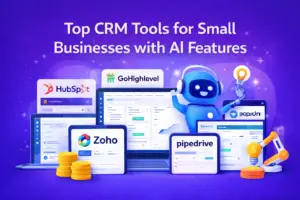
HubSpot CRM

HubSpot offers a unified platform that combines marketing, sales, service, and content tools. It supports automated workflows that trigger follow‑ups, assign leads and score prospects. The system’s AI features suggest next steps and personalize email sequences, making it ideal for small and midsize businesses that want an all‑in‑one solution. HubSpot’s free tier allows basic contact management and limited automation, while paid plans unlock more robust sales workflows.
Salesforce CRM
Salesforce provides enterprise‑grade customization and an extensive app ecosystem. It’s best suited for mid‑sized to large companies that need complex integrations across departments. Automation features include AI‑powered lead scoring and routing, but the platform can be expensive and requires more setup compared to other options.
Zoho CRM
Zoho delivers a cost‑effective solution with moderate automation features. It includes lead and deal management, advanced workflows and an AI assistant named Zia for predictive analytics and forecasting. This makes it a good option for growing businesses needing solid automation without paying enterprise prices.
Pipedrive and Freshsales
Pipedrive focuses on sales pipeline management and activity‑based selling. It’s ideal for teams that want an easy‑to‑use CRM without heavy marketing automation. Freshsales by Freshworks provides a unified view of contacts, AI‑powered sequences and workflows at a budget‑friendly cost, though some features are locked behind higher tiers.
ActiveCampaign and EngageBay
Independent reviews highlight ActiveCampaign and EngageBay as strong performers in automation. They offer a wide range of triggers and actions that allow businesses to automate marketing and sales processes, including lead scoring and follow‑up emails. ActiveCampaign’s AI capabilities can generate segments, build workflows, score leads and even calculate win probabilities. EngageBay provides visual automations and a kanban interface for managing tasks, making it a user‑friendly choice for smaller teams.
Conclusion
CRM automation isn’t about replacing human interaction—it’s about ensuring that people get the timely responses they expect. By automating missed-call text-back responses, creating personalized follow‑up workflows, and using lead scoring to prioritize prospects, businesses can convert more leads, reduce manual work, and improve the overall customer experience. The right tool will depend on your team’s size, budget and integration needs, but whether you choose HubSpot, Salesforce, Zoho, Pipedrive, Freshsales, ActiveCampaign or EngageBay, automation will help you stay competitive. As a Calgary digital marketing agency, leveraging CRM automation is essential to delivering better service across SEO services, social media marketing, PPC campaigns, CRO services, reputation management, local SEO services, web development, and marketing automation for home services. Start small—maybe with missed call texts or basic follow‑ups—and scale your workflows as you see results.
Frequently Asked Questions (FAQs)
How does CRM automation help with lead management?
CRM automation turns a manual, error‑prone process into a scalable system. It automatically assigns leads based on rules, sends timely follow‑ups and recycles leads that aren’t ready to buy. Modern systems also score prospects based on engagement and route them to the right representative. These capabilities reduce response times by up to 82% and free teams to focus on high‑value activities rather than data entry.
What are the best CRM automation tools for small and medium‑sized businesses?
Popular options include HubSpot CRM, ActiveCampaign, and EngageBay. HubSpot provides an all‑in‑one platform with marketing, sales and service tools and extensive automation features. ActiveCampaign excels in automation triggers and AI‑powered lead scoring, while EngageBay offers user‑friendly visual workflows and built‑in calling. For companies needing enterprise capabilities, Salesforce, Zoho CRM, Pipedrive, and Freshsales are strong contenders.
How do missed call text‑back systems work?
A missed call text‑back system forwards your business number to a platform that sends an automatic SMS whenever a call goes unanswered. The message can thank the caller, provide key information or prompt them to book a call. Case studies show that these systems increase response rates by around 30% and help companies recover 40% more leads. Integration with your CRM means replies and follow‑ups can happen without manual intervention.
Are there risks or challenges with CRM automation?
While automation offers clear benefits, it requires thoughtful setup. Poorly configured workflows can send generic or mistimed messages that annoy prospects. Implementation costs may be higher for advanced AI features, and free plans often have limited automation. Data quality remains critical; without accurate information, scoring and routing rules can misfire. Start with a simple workflow, test it carefully, and use your CRM’s analytics to refine your approach over time.
References
[1] Jetpack CRM, “Automating Client Follow‑Ups: How CRM Can Prevent Missed Opportunities,” 2025.
[2] DevTrest, “Missed Call Text‑Back Automation: Turning Lost Leads into Instant Opportunities,” 2025.
[3] Slack, “Lead Management in 2025: Proven Strategies to Convert Leads into Customers,” 2025.
[4] HubSpot Blog, “CRM Tools with Automation: Our Top Picks for 2025,” 2025.
[5] EmailToolTester, “9 Top CRM With Automation Tools for Small Businesses in 2026,” 2026.
[6] SuperAGI, “Mastering Speed‑to‑Lead Automation in 2025: A Step‑by‑Step Guide for Instant Responses and Higher Conversions,” 2025.
[7] MarketsandMarkets, “2025 Sales Automation Guide — From Admin Relief to Pipeline Velocity,” 2025.